Let's answer your questions here!
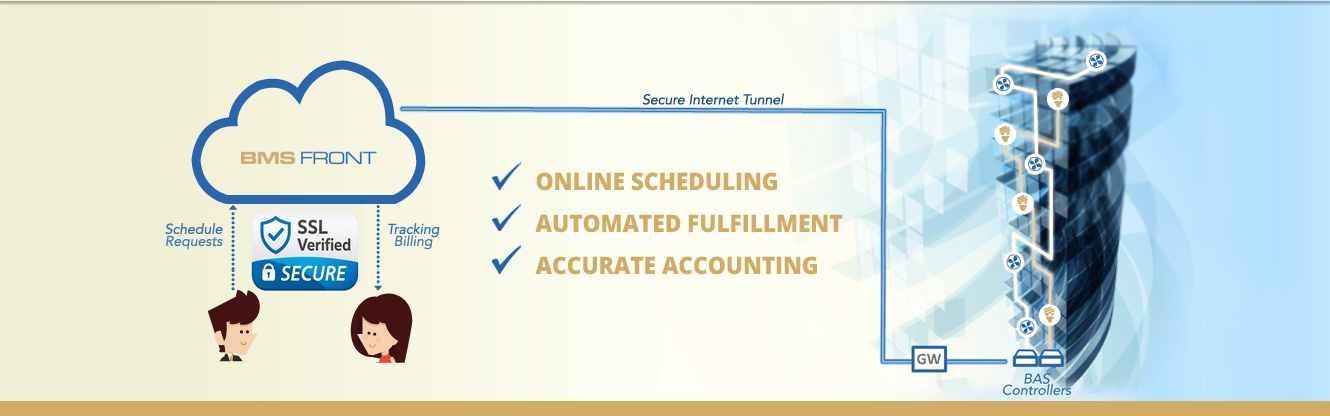
The BMS Front service is hosted in the cloud. It functions by connecting over the Internet to existing web-enabled building management systems (BMS) which in turn use a variety of control protocols within the building to control various downstream equipment, appliances, and devices. These typically control air conditioning and lighting for lease spaces.
When a tenant schedules a service request, the system communicates with the BMS in order to automatically perform the same types of schedule overrides that building engineers currently apply manually. Naturally, accurate usage accounting is built into the system.
If the BMS does not respond to a command as expected, the system flags it and can notify your facilities team by SMS or email, so they can intervene and rectify faulty downstream equipment.
The BMS Front portal acts as a central location in the cloud for managing after-hours services.
No, you still use your normal occupancy schedule. BMS Front is an overlay service designed to automate the scheduling, fulfillment and accounting of After-Hours service requests. So you can take yourself out of the loop, and avoid meddling with your equipment and settings to make exceptions to the normal occupancy schedule. You stay out of the exception loop on the occupancy schedule. You still watch whether requested services start and stop as expected.
BMS Front is a cloud service requiring no local servers or additional equipment at your premises, other than a Building Automation System controller, which you most likely already have.
Price is per building. We may offer a lower price if you have more than one. Contact us or your provider for a quote. The subscription covers the BMS Front service only. Connecting your BMS and configuring your building is arranged with your system integrator and billed separately by them.
At the end of a billing period, you log in and use our simple report tool to generate a usage report for each tenant. It only takes a few seconds. The usage report comes in PDF format and is laid out much like an invoice, with each fulfilled service request itemized. You can attach it to your tenant lease invoice or simply transfer the total to an "after-hours" line-item on your lease invoice.
For single requests, this can be done up to a year ahead of time. For standing/recurring requests, these can be scheduled indefinitely by a building manager.
You either need an existing building automation system in place or be ready to invest in putting one in. It doesn't have to cost an arm and a leg for simple tenant overrides. Please consult with your preferred system integrator to ensure you consider your immediate and future building automation needs before selecting a system.
No app is required. The user interface is based on HTML5 and "responsive design" so it works on literally any device, regardless of the screen size and orientation.
Once your building is configured and connected to your BMS, invite your tenants and they can start right away.
The BMS Front website and user portal both use industry-standard TLS encryption – the same security used by the online payment industry – so traffic is encrypted in transit, even when you or tenants connect from home or via the mobile Internet.

No long-term contract. Choose monthly or yearly. Each term renews unless you cancel before the renewal date, and your order sets the terms for that building. If another company bills you, their terms apply.
If BMS Front bills you, cancel auto-renew on the BMS Front website before your renewal date. You keep access through the term you already paid for, and your order has the full terms. If another company bills you, contact that company to cancel.